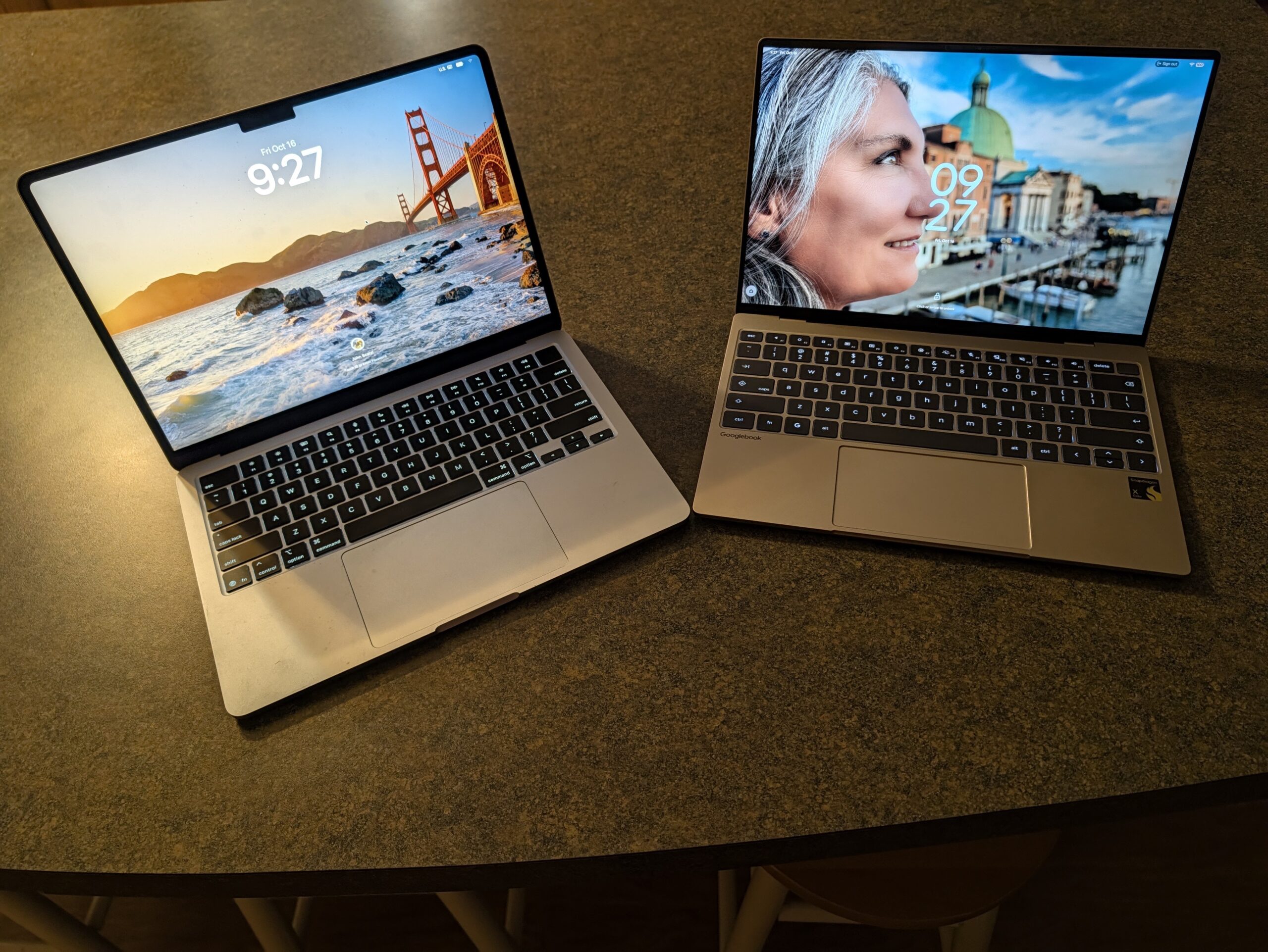
Posted October 27, 2026 Posted by John Scalzi I’ve had the Googlebook for a couple of weeks now and have had a chance to use it regularly and compare it to the MacBook Air I have (it has an M4 processor). One of the things I was curious about is which one I would end up using more often and which I would prefer over the other, if there really was a preference. I’m not going to go into much detail: I prefer the MacBook Air to the Googlebook. This is due to a number of factors, some related to software and others related to hardware. The Googlebook is a great little machine and I’m very happy to have it, but it’s not completely ready and it shows. For an everyday use case, the Mac Air is still the one I use. This isn’t just theoretical: I was actually away this weekend attending a convention in the Denver area. At first I thought about taking the Googlebook, but at the last minute I switched to the Mac Air. I was concerned about things like connectivity while traveling and also the ability to open certain apps that I would need while away. I ended up taking the Googlebook out of my backpack literally when I was leaving the house and putting the Mac Air in. I don’t regret the choice. There are things I like about the Dell XPS version of the Googlebook over the MacBook Air I have. On the one hand, I like the keyboard much better. The one on the Air is too soft for me, while the keyboard on the XPS feels punchy and fits perfectly. If we went straight to the keyboard, I don’t think it would be a question for me. I also like the slightly smaller form factor of the XPS over the Air. This is very much a sort of six of one, half a baker’s dozen of the other, because of course the Air is also very small, very thin and very light, as is the XPS Googlebook. But the form factor of it – a 13-inch screen instead of a 14-inch screen and so on – means the XPS is a little more convenient in places like airplanes or anywhere else where space is at a premium. Again, both are small enough for most use cases, but if that’s a consideration then the Googlebook has an advantage. Finally, and as I mentioned in my previous Googlebook article, Googlebook’s Rambler feature, carried over from the latest edition of Android to Pixel phones, is truly something magical. I wish all laptops had this. The ability to simply dictate and publish it as text with very little need for editing is something spectacular. If it weren’t for all the other problems the Googlebook currently has, the Rambler itself would be enough to make me want to choose the Googlebook over other laptops. It is truly one of the best speech to text apps I have ever used. In terms of hardware, most other issues are very minor compared to the MacBook Air. The trackpad is not as smooth and pleasant as the MacBook Air’s trackpad, but of course almost no other laptop has a trackpad that is as pleasant as the MacBook trackpads. The screens are practically a wash in terms of quality. Both are nice and clear and have more than enough resolution. The Googlebook has a 120Hz screen refresh rate, which is double that of the Air, but honestly, on a day-to-day basis, if you’re not playing video games, you probably won’t notice it. Both computers are very limited in terms of I/O, and both only have two USB-C ports, although the Googlebook pulls ahead by having USB-C ports on either side of the chassis, while the MacBook Air only has them on the left side. On the other hand, the MacBook Air has a headphone jack, something the XPS doesn’t. So they’re both a little awkward in their own way. The XPS Googlebook’s only major hardware issue, which is also a software issue, lies with the speakers. The volume of anything you play becomes louder and softer for no reason, and there’s still no easy fix for it. When I first wrote about the laptop, I didn’t notice there was a problem with the volume, but it’s there and it’s really fucking annoying. At first, I thought it was just a problem with YouTube and went into YouTube settings to fix it, but it turns out it’s a problem with other programs as well. It is a known problem; If you go to Dell’s site, they have it recorded as something they know exists and are going to work on fixing it, but apparently the update won’t be ready until December at the earliest. It’s so noticeable and so annoying that it really makes me not want to use the XPS. It’s that bad. Beyond that, when the volume is near maximum on the XPS, the entire chassis vibrates and the sound becomes distorted. It’s really bad, unlike the MacBook Air’s speakers, which are actually pretty good. It’s not even a comparison; In this case, the MacBook Air blows the Googlebook out of the water. For both volume stuttering and distortion, the current “fix” for the XPS Googlebook is to use a Bluetooth speaker or headphones. But you shouldn’t have to do that to get decent sound on a $1000 laptop. This should have been resolved before they shipped. When it comes to software, the disadvantage the Googlebook has over the Air is simply that it relies primarily on Android software versions, which simply don’t have as many features as the MacBook versions. The two programs I use daily are Microsoft Word and Adobe Photoshop. On Googlebook, the Android versions of these programs are fine for quick and dirty things, but they don’t have the full set of features that I really want and need to do my job. This is fine if I don’t have a lot of work to do, like if I’m on vacation or if I’m just doing something that I can use Gmail or Google Docs for. But this weekend, when I went to that convention, and later when I’ll be on tour, I’ll be working on my next novel. I need at least fully featured Word. Now, to be scrupulously fair about it, I’m not going to give too much thought to the Googlebook for being so heavily reliant on Android. It is simply a reality for this initial version of this operating system. I don’t think you should come to Google’s book thinking you’re going to get anything more than perhaps slightly improved versions of Android apps. But from a purely practical point of view, which is what I have to have when I’m actually trying to work instead of just sending emails, it’s a problem. You have to keep that in mind. At least for now, the Air still wins in practicality. (You’ll notice that I’m not giving much time or space to any of the Googlebook’s “AI” features, and that’s only because I mostly don’t use them. In this case, it’s no different from the Air, which I also don’t use any of Apple’s more recent “improvements” through the use of “AI.” So, for my use case, the two are about even in this regard.) As hinted at above, in many ways it’s fundamentally unfair to compare a Googlebook with an entirely new operating system to a MacBook Air that’s several generations old with an operating system that’s been developed over decades. I’m reasonably optimistic, even with Google’s tendency to kill things, that the Googlebook will get better and its operating system will get better and smarter. Google has committed to 10 years of updates on this machine and we’ll see if that will actually be the case. But we can certainly expect at least a year or two of company refinement. Then, maybe within a year or two, it could become a laptop that I would take on a long business trip. But for now, I’ll have to stick with my MacBook Air for any trip that requires more than the most casual use of Gmail and Google Docs. I often have to work when I travel, and that means I need a laptop that can do everything I need. That’s still the MacBook Air. – JS ← The big idea: Kevin J. Anderson