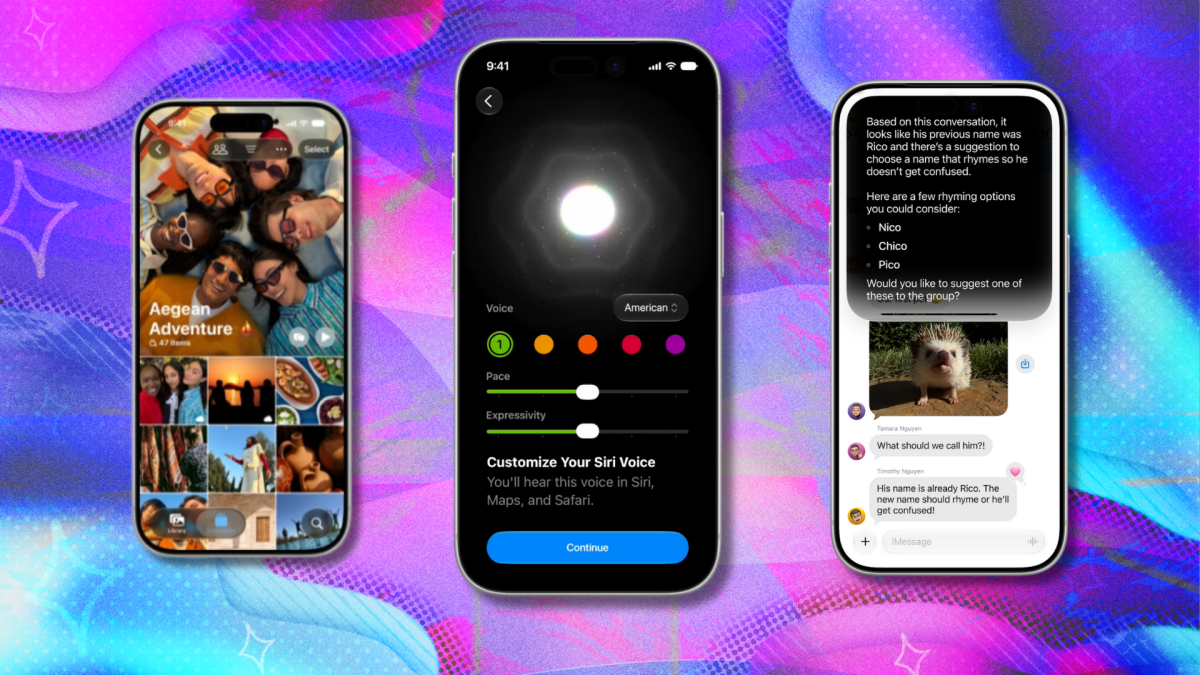
Apple’s most important software platform is about to receive a big update. In a couple of weeks, Apple will finally release iOS 27. Yes, we have seen and tested the developer betas and the public betas. Right now, we are in Developer Beta 7 and Public Beta 5; At this point in the game, we don’t expect to see any major new features when iOS 27 properly launches, although surprises are always possible. After all, the main event is called “Surprise and Shine.” However, for most users, iOS 27 releasing next month is the new version, as most people don’t (and shouldn’t) bother installing the public beta. So, here’s everything we’ve learned from testing iOS 27, including the Siri AI beta and a list of the most popular new features to try when it launches. Guess what Apple will release in September in our Big Guessing Game: Apple Edition. Enter now for your chance to win an Apple Watch! When will iOS 27 arrive? The theme for Apple’s September event is “Surprise and Shine.” Credit: Apple The final version of iOS 27 is likely to arrive in mid-September. More precisely, since Apple will launch new iPhones on September 9, we will probably get iOS 27 a week later, on September 16 (give or take a day or two). If you’re still eager to try the latest beta (which will surely be very similar to the final version), here’s how to do it and what you can expect from it. Who will be able to install iOS 27? Apple’s iOS 27 will be available for iPhone 11 and later, as well as iPhone SE (2nd generation and later). Additionally, Apple’s upcoming iPhones, which are reportedly the iPhone 18 Pro, 18 Pro Max, and foldable iPhone Ultra, will almost certainly run iOS 27 out of the box. How to install iOS 27? If you have a compatible device (see above), the process will simply involve going to Settings, General, Software Update on your iPhone and choosing to install the new operating system. The process should take approximately 10 minutes (depending on your Internet connection). It is always advisable to back up your phone before updating the software, although in this case we do not expect any major problems; Apple’s latest major software releases tend to be quite polished. What’s new in iOS 27 There are many new features in iOS 27, and the crown jewel among them is improved Siri (now called Siri AI), as well as Apple Intelligence, both of which permeate the device’s many features and built-in apps, offering new, simpler ways to perform everyday tasks. On top of that, the Liquid Glass interface has been updated with more customization, numerous apps including Safari, Reminders, Notes, Photos, and Health have gotten new features, and the iPhone should generally perform better. The new features range from major changes to small aesthetic improvements. Apple has an overview here; Below, here’s our pick of the best new features you should try after installing iOS 27. One caveat: some of the AI features are not available in the EU due to Apple’s dispute over AI with European regulators. There is currently no timeline on when this might be resolved. That being said, here are the 7 best features of iOS 27 that you should try after installing it. Siri AI Siri AI will bring a ton of new capabilities to your iPhone, with the help of Gemini. Credit: Apple If you’re in the US, Siri AI will work for you and you can access it by saying the “Hey Siri” voice command, pressing and holding the iPhone’s side button, or by swiping down from the Dynamic Island at the top of your screen. Once activated, you can use it to search for documents, emails, and photos on your device, ask questions about a website on your screen (or any type of general question), get recommendations for places and activities, and easily create home automation. Mashable Light Speed Siri understands this personally, as it can extract context from your emails and other documents. He also knows a lot about the world, which makes it similar to LLMs like OpenAI, so you can ask him questions or assign him tasks related to you personally, or just ask him about any topic you like. For a detailed description of Siri’s new features, go here and here. Visual Intelligence Point your camera at things and Apple’s Visual Intelligence will give you some details about those things. Credit: Apple Unfortunately, the same caveat applies to this one: it’s not available in the EU at launch. It’s a shame, because it’s a cool feature that lets you point your camera at things and get information about them from Siri. This includes splitting a restaurant bill, getting work hours for a company, determining what plant or animal you’re looking at, and more. You can access Visual Intelligence by clicking and holding the Camera Control button or (if you have an iPhone that doesn’t have the Camera Control button) through Control Center or by customizing the Action button or Lock Screen. Child Safety Every parent knows what a nightmare parental control features can be. You think you’ve set everything up right, only to discover that your child still has unlimited access to YouTube (and uses it without any limits). In iOS 27, Apple has overhauled Child Safety features with easier setup, more granular control over apps and websites, and better screen time management. Communication Safety can even intervene before a child sees blood or violence in videos and images shared through Messages and FaceTime. There are detailed options for time allocations in several categories, including Entertainment, Gaming, and Social Media. Perhaps most importantly, there are now simple controls to completely pause device use or allow unlimited use of a device. Messages, Mail, Calendar, Safari Updates Less chaotic Safari tabs? We are ready for that! Credit: Apple’s new Siri intelligence extends to several built-in Apple apps. For example, in both Messages and Mail, Siri can type things for you based on a description and the result will match your style. Both apps will also offer suggestions based on your conversations, such as adding events to your Calendar or a reminder to your Reminders app. Safari has also gotten smarter. It’ll automatically group your tabs into themes, and a particularly cool new feature called Notify Me can monitor a web page for changes and send you an alert when it detects something new on the page. Better Photo Editing Reframe is one of three new AI-enhanced photo editing tools in iOS 27. Credit: Apple Apple has fallen far behind when it comes to AI-assisted photo editing. Samsung Galaxy and Google Pixel phones have a full set of image editing tools that work very well. With iOS 27, Apple is finally catching up to its Android competition. The new AI-enhanced photo editing tools are a great way to fix your photos, even some that went pretty wrong. The three new tools, available in “Tools” when you start editing a photo, include Clean Up, which lets you remove unwanted objects with a tap or gesture. The Extend tool will automatically add content around the edges using AI, and Reframe lets you adjust the perspective of a photo. Smarter Shortcuts I don’t know many people who use Shortcuts on iPhone, probably because the idea of manually setting up a chain of actions for your phone sounds pretty complicated. In iOS 27, however, Apple has simplified this by adding the option to describe the shortcut and create it automatically. To access it, open Shortcuts and tap New Shortcut, and simply describe what you want the shortcut to do. Things like “Turn on the lights, turn on Do Not Disturb, and start playing my favorite album” should work. New Image Playground Apple’s new Image Playground can now create photorealistic images. Credit: Apple Yes, another thing that is absent in the EU. If you have it, it’s great. Image Playground existed before, in iOS 26, but the images it could generate were mostly cartoons or simple illustrations. Now you can also get photorealistic images. If you don’t like the result, you can adjust it by adding additional messages, with the option to precisely mark the part of the image you want to change. Liquid Glass Settings This one is small, but it’s important to a lot of people. In Settings and Appearances, you can now set exactly how clear or tinted you want your “blended” apps and UI elements to be in iOS 27. Personally, I push the slider to the left for a maximum clear look, but people who want more readability over visual pizzazz may want to push it the other way for a more tinted look. SEE ALSO: Everything we’re looking forward to at Apple’s iPhone launch event in September. AirPods EQHow long have we been waiting for this one? In iOS 27, Apple finally added detailed equalizer settings for AirPods. However, finding those settings is a bit tricky. When your AirPods are connected to your phone, go to Settings, Bluetooth, navigate to AirPods, and then tap the little “i” on the right. Then go to Audio & Routing, Equalizer, Custom. From there, you can adjust the bass, mids, and treble to your liking.