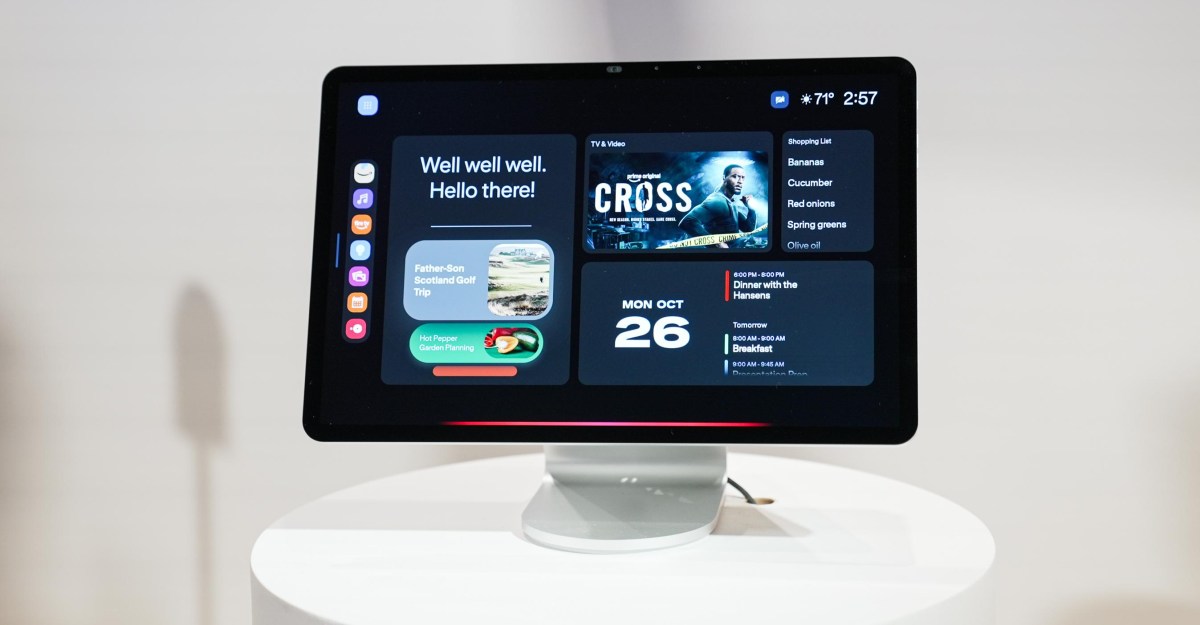
Amazon’s latest Echo Show smart display is big, beautiful, and incredibly expensive. Announced today, the Echo Show 16 costs $499.99 (wall mount included) and is now available for pre-order. There’s a Nanomatte display option for $569.99, plus a $100 pre-order discount ahead of its release later this year. After spending time with the device at a small media event in New York City this week, I think the Echo Show 16 could be the versatile family hub Alexa users have been asking for. The sleek hardware brings with it an entirely new software experience, including better smart home controls, a much-improved calendar interface, and a real photo frame option, all fully customizable. But at twice the price of the $250 Echo Show 11 and $200 more than Apple’s new HomeView smart display, it may be too expensive, even for die-hard Alexa fans.1/5The Show 16 comes with new display styles you can choose from: The Smart Home display can be an always-on dashboard for your connected devices. The distinguishing feature of the Echo Show 16 is its new customizable home screens. Called display styles, you can choose between a family organizer, smart home dashboard, Alexa widget display, or digital photo frame. Unlike existing Echo Shows, these home screens can stay on all the time or appear when you approach, giving you quick access to your calendar, a new meal planning feature, or your most used smart home devices. This type of easy interaction has been largely absent from smart home displays, which have traditionally been voice devices, with the screen providing additional visual context for the internal voice assistant. Over the years, Amazon has slowly added more features to its smart displays, and the Echo Show 16 feels like the culmination of those efforts. With its size and thin bezels, the Show 16 looks much more like a tablet than a smart display, specifically the new Alexa Tablet Pro 12. It even has the same anti-glare Nanomatte display as an upgrade option and has a MediaTek processor instead of Amazon’s AZ3 chip. “A lot of the same work was done as the tablet,” Amazon’s head of devices and services, Panos Panay, confirmed to me. The Echo Show 16 can be mounted on a new swivel/tilt stand that costs $124.99. There is a static stand for $69.99. The Show 16 can also be mounted on the wall. It is compatible with VESA mounts and comes with its own stand in the box. This is the wall mount included in a disassembled version of the Show 16. It only requires one screw. When mounted on one of two optional stands, the Show 16 starts to look like a small iMac, giving off some strong home computer vibes, although it’s almost too big for a kitchen counter. It’s much slimmer than the Echo Show 15 or 21 (also $499), with significantly thinner bezels. In my hands-on, the Show 16’s Full HD display felt responsive and the screen was bright and clear with deep blacks. The sound is better than a tablet and on par with the Show 11, thanks to a slim speaker box that extends the length of the screen and contains eight custom woofers and two tweeters. “The Way I Am” by Luke Combs was clear and loud, and the sound was smooth, although it lacked a little depth. I wasn’t able to test the new microphone position (four in total) to see if Alexa can hear better in this form factor. A new interface for the Cooking Library. You can use recipes from the Alexa database, email them, and upload photos of them. While the hardware is impressive, the software is where the experience improves. The Show 16 is designed as a home hub, a central place to view the family calendar, check the week’s meal plan, view family photos, control smart home devices, and see who’s ringing the video doorbell. It also runs the full Fire TV interface and comes with a newly redesigned Alexa remote that feels much better in your hand. You can now disable the Alexa Recommendations screen that shows ads in full screen. Along with Screen Styles, you can choose between one of two ambient screen savers that appear when you’re away from the device: a photo frame or Alexa Recommendations. You can also skip an ambient screen entirely and keep your home screen accessible at all times. Alexa Recommendations is the same concept as the customizable rotating screen you see on today’s shows. This can display weather, news, photos and other options, along with display ads. Amazon didn’t demonstrate this option at the event, but according to Aidan Marcuss, incoming vice president of Alexa and Echo, this display “will continue to offer a wide variety of content, just as it does now.” I asked if this includes full screen ads; confirmed that yes, but they will appear only there, not on any other home screen, and that you can turn off Alexa Recommendations. The customizable Favorites bar lets you switch between apps easily. The Show also features a new 13MP wide-angle camera with IR, enabling night vision for the first time. In addition to being a home security camera, it can also be used for visual identification and video calls. Another key change to the interface is a new favorites bar that you can access from most screens. Opens a programmable quick bar that allows you to switch between device functions, including third-party Alexa integrations and skills. This small change makes the device easier to navigate by touch than the current Show interface. It opened quickly in my practice and selecting an app took me directly to the corresponding screen. Of course, this is an Alexa Plus device and you can still navigate by voice and chat with the brain-boosted assistant. Daniel Rausch, current vice president of Alexa and Echo, who will take on a new role at Amazon next month, says the latest version of Alexa Plus can perform deeper research and is smarter. “It has access to more models and now has deeper reasoning, is more capable of multitasking, and is better at breaking down both complex and vague tasks,” he said. Alexa Plus has a new “next best actions” feature that makes proactive suggestions based on your conversations with it. The demo showed Alexa offering suggestions such as where to buy chicken wire when you had talked to her about building a chicken coop, or suggesting hiking trails and YouTube videos when you were planning a trip to Scotland. These suggestions appear in a new Alexa Plus interface in the Show, built around “Cards.” Panos Panay demonstrates the new Alexa Cards feature. Assistant answers now fit better on the screen, take up less space, and are collapsed into organized cards that you can return to. These cards, which also appear in the new Alexa app and on Alexa.com, act as Alexa’s memory, allowing you to return to a conversation and pick up where you left off; You can also pin cards to the Show on the face of the Alexa widget. The card interface uses screen space better than the current way of talking to Alexa on the Show, which simply fills the blue screen with white text. Another feature that takes advantage of the large screen is an improved map view. This is a ground-up rebuild of the Map View that launched in 2023, giving you access to all your smart devices in a 3D interface that you can expand to control lights, locks, cameras, and more on-site. Map view lets you control your smart home devices based on where they are. The map updates in real time, so when you turn on a light, the room on the map lights up. It now gives you a panoramic view of your home and neighborhood and can access any outdoor Ring cameras you have. If someone approaches your house, you’ll see a figure on the map and can tap it to get a live view of the camera that detected it. The new UI and its features will eventually come to all current Show devices, although Amazon didn’t share a timeline. However, Marcuss confirmed that while the new customizable home screens are included for free in Show 16, it will require a subscription on older devices. He did not confirm the exact price. As a category, smart displays have often felt like solutions looking for a problem; They promise to do too many things, but rarely do them very well. Based on my short time with the Show 16, Amazon may have solved that problem and delivered a really useful device. But it’s still a big question whether it’s a solution worth spending $500 on. Photos by Jennifer Pattison Tuohy / The Verge Follow the topics and authors of this story to see more like this on your personalized home page and receive email updates. Jennifer Pattison TuohyClose Jennifer Pattison TuohySenior Reviewer, Smart Home Posts from this author will be added to your daily email digest and home page. by Jennifer Pattison TuohyAmazonCloseAmazonPosts in this topic will be added to your daily email digest and home page.FollowFollowView all AmazonAmazon AlexaCloseAmazon AlexaPosts in this topic will be added to your daily email digest and home page.FollowFollowView all Amazon AlexaPracticalClosePracticalPosts in this topic will be added to your daily email digest and your home page. home page feed.FollowFollowView all news tipsCloseNewsPosts in this topic will be added to your daily email digest and homepage feed.FollowFollowView all newsReviewsCloseReviewsPosts in this topic will be added to your daily email digest and homepage feed.FollowFollowView all reviewsSmart HomeCloseSmart HomePosts in this topic will be added to your daily digest email and home page feed.FollowFollowView all smart home techCloseTechnologyPosts in this topic will be added to your daily digest email and home page feed.FollowFollowView all tech